
Your e-mail address hidden with jQuery?
Last week we published an article with different methods to hide e-mail addresses on websites. Because of several comments with suggestions on how-to solve this problem, we provide this week a solution which is “from these days” and more powerful.
Based on the idea if you don’t show an address, a spambot can’t see it, we use in our example a simple Ajax call (using jQuery) and show a tiny box with some friendly message including the link with e-mail address.
How does it work?
First we need to create a simple php file that holds the content and the e-mail address, we use json_encode to make the string less readable:
<?php
// change the two vars below
$email = 'user@mail.com';
$html = 'Please contact us by e-mail: <a href="mailto:%%mAdr%%">%%mAdr%%</a><br /><br />
<a href="javascript:void(0);" id="hideme">Close</a>';

$eparts = explode('@', $email);
$data = array('ename'=>$eparts[0], 'dom'=>$eparts[1], 'htmlcode'=>$html);
echo json_encode($data);
Don’t forget to block that file in your robots.txt file!
Now we need a function that will load the external content into the current page using an Ajax request.
$(document).ready(function() {
	$("#clickme").live('click', function() {
    	$.ajax({
	  		url: 'glink.html',
                        dataType: 'json',
	  		success: function(data) {
				var adr = data.ename + '@' + data.domain;
	  			var newdata = data.htmlcode.replace(/%%mAdr%%/g, adr);
				$('span#ajaxresp').html(newdata).slideDown('slow');
				return false;
	  		}
	  	});
	});
	$("#hideme").live('click', function () {
		$("span#ajaxresp").html('').slideUp('slow');
		return false;
	});
});
jQuery code in detail
A visitor has clicked the element with the ID “clickme” and the Ajax request for the file “glink.php” is done. On “success” parse the html string with the two other json pairs and add the result to the SPAN element with ID “ajaxresp” is filled with the response from the external file and the box will slide down. To make the elements from the Ajax content accessible, we use “live()” events instead of the “regular” click event.
The visitor need to click the element with ID “hideme” to slide an empty “Ajax box” back to the original position.
Additional we give our dynamic email box some style using CSS:
span#ajaxresp {
	margin: 5px 0;
	text-align: center;
	padding:10px;
	display: none;
	border:2px solid #CCCCCC;
	background-color:#EDECEB;
}
The following code holds the “contact” link which is using the click event and the small container where the Ajax response data is placed.
<a href="javascript:void(0);" id="clickme">Contact</a><span id="ajaxresp"></span>
If your visitor has clicked this “contact” link the following box appears:
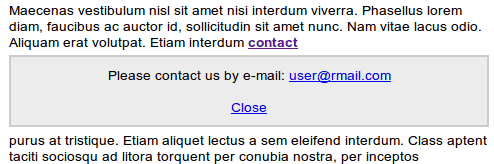
If you have the jQuery and CSS code in external files, it’s possible to use the function on all your pages. The best thing is that the loaded box has also room for a personal message for your visitor. It’s just a simple solution without the need of building a Ajax contact form. This was the third article of a series with solutions on how-to add the contact information to your article or website.
Published in: jQuery Code · PHP Scripts

Very Nice,
but do you really believe that spammers forget to check robots.txt?
I’d rather think that they are eager to follow each and every file they can find inside.
But you can fix this by taking care your glink.html is NOT listed in robots.txt in combination with masking the name of glink.html inside your script by doing like so:
var a = ‘gli’;
var b = ‘nk’;
var c = ‘.h’;
var d = ‘tml’;
var fetchThis = a+b+c+d;
Greetings, Nicolas Breitwieser
Hi Nicolas,
you’re right why should a spambot follow the rules from a robots.txt file. You suggestion is similar from the article last week. I think it will be better to use some php script and sessions to hide the content if the file is directly accessed.
My first idea was to use a unknown extension like glink.xyz, The Ajax request will still work and search engines will not index those files… what do you think?
Hi Olaf,
yes, of course it is possible to put a php script in the middle (browser request -> php script -> accesses glink.html and returns its content). With this approach you can improve your protection by checking the environment variables like $HTTP_USER_AGENT, e.g. But I think modern bots will just send valid information in their requests as well. Regardless of this, using PHP in between is not a pure JavaScript solution, which (so I think) you wanted to propose in the first place.
I think the basic problem with pure JavaScript is, that a bot has the same information as a regular user. He gets the same html code (because if you could recognize the crawler, there would be no problem). And all you can do is try to mask either the email address itself or its source file (glink.html).
Your idea with the unknown extension is very good, as it gives additional protection at a ridiculously low effort.
On linux machines you can even totally omit the file ending.
Leaving the pure JavaScript constraint and going back to using PHP again, I can think of the following more robust solution:
In your website you can check for mouse movement and include some x-y pairs of it in the ajax-request to your PHP script. Additionally you can append to this request the time elapsed since the page was loaded (and have your PHP script require it to be greater than, e.g. 2 seconds).
For bots, I think, it will be very difficult to guess correct parameters that match to a real user’s behaviour.
Regards, Nicolas Breitwieser
Thanks for your suggestions.
I didn’t used a php script because it was over the top (maybe?).
A bot recognizes patterns and most of them are not so smart. I think, if I send from a PHP file the response in 4 parts formatted in JSON, it will be secure enough and it’s still user friendly for the beginning webmaster.
Just updated the code to use a PHP file which gives a response a Json formatted string. In our jquery function we parse the html and replace the fake email address values with two passed variables. I hope you guys like it :)
I think it’s a pretty dumb idea to rely on a client side technology that many people have blocked with NoScript in the first place and that uses security by obscurity (especially the robots.txt entry for that file is probably going to fire back) for such an essential thing. Here in Germany this can very well get you in costly legal problems because you can get sued if you don’t supply a working way to contact you.
More interesting would be how many spiders support javascript nowadays =)
Hi Niklas,
If people block Javascript, they can’t access most of the common websites. Remember we live in 2010!
Sure if a bot is programmed to analyze Json code there might be a problem, but this way the bot has to find the file first and than needs to understand the response.
And for your German “legal problem”: It’s a requirement to have an “Impressum” and there NO requirement to provide an email address (because the spam risc).
I’m afraid you get confused bt getting too much spam :D
At the end these examples are to fight back spam, there is no solution which works for 100%.
Hi, thats all and well but would it not be a lot much easier if you you simple base64 encode it and then reverse in javascript?
if you dont want to use any 3rd party libs for that simple str replace like @ -> … and . -> .. would do to fool any crawler.
in some frameworks (like drupal) you can register javascript variables from within php code and then use them on site with no js generation at all just using generic function. Id recomment that approach. just add map htmlID -> encodedemail and then one function will replace them all with no code changes. Oly problem is that you need a post filter to wrap all mails into divs/spans or something to assign unique ids on the page.
ps. im also not buying ‘some people have js off’ so they will see no emails. big deal : ) (id add default css display none on these divs so if function does not run no email will be shown)
hello Artur,
you’re right that are good possibilities as well and I’m sure there are people on the net with complains or comments about them :)
My Approach is to provide solution which are more or less effective and easy to use (for the webmaster and visitor).
Since we have all the spam these days the most effective way is to use a contact form, but for example companies like to give their email address instead.
Hey Blocking Javascripts Will Seriously not be possible in this era of web techs. Have To Find A Solution To Block Spams in a better way…
Hello Reena,
please explain what you like to say.
This example doesn’t block Javascript
As an alternative to such complicated solutions, we can simply substitute the symbol @ with the html transliteration. for example if we substitute the copyright symbol with ©
Hi,
we mentioned a similar solution in the previous article or tutorial and maybe you can tell the html entity for the @ symbol? :D
I personally prefer to use contact forms as much as possible.
But if that is not an option, than this is a useful method. Thanks for the code!