
How to use the Flickr Photo Search API
I have found one of the best places to find pictures to use on my websites is Flickr. They make it fairly easy to automatically embed Flickr photos onto your website using the Flickr photo search. This Flickr API tutorial will show you how to use the Flickr API to retrieve and display Flickr photos on your own website.
Before using the Flickr photo search API and the PHP tutorial I am sharing with you here, make sure you consider the copyrights assigned to each image. Many of the photos and illustrations on Flickr remain under copyright and will require attribution and/or permission to use on your own projects.
How to use the Flickr API
As you may know, the Flickr API provides web developers with a number of tools for accessing their image database. For this Flickr API tutorial, we will be using a custom PHP/CURL function to receive the data stream from Flickr. The data that we will receive is in the form of a serialized PHP array. We will need to unserialize the array before working with the information. We don’t use the native PHP function file_get_contents(), because many web hosts don’t permit the use of this function. Even if your host does permit using it, I suggest that you use a CURL based function, because the PHP/CURL functions offer many more options. If you request some data using a PHP script, it’s important to send a valid User Agent string together with the request. There are many 3rd party applications that handle requests with a missing User Agent information as SPAM.
Flickr API authentication
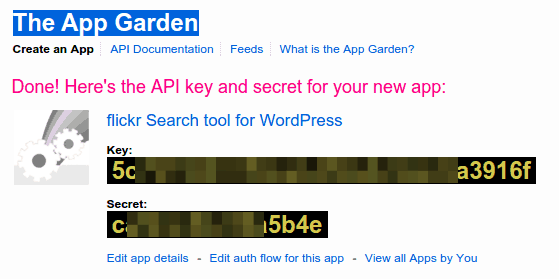
The API methods that we will use in this tutorial do not require authentication. But we will need to use an API key. Login with your Yahoo! account to get your free API key from the Flickr web application site.

Choose the required key type, provide some information about your application and submit the form. You will be given a personal Flickr API key and secret; we’ll only need the key.
Flickr PHP Class
First we need to create a class structure. We will be defining a private variable for the “API key”, a class constructor, the function that will request the content and the function that will later perform the Flickr photo search.
class Flickr {
	private $apiKey;

	public function __construct($apikey = null) {
		$this->apiKey = $apikey;
	}

	public function search($query = null) {
	}

	// A replacement for the function file_get_contents()
	private function file_get_contents_curl($url) {
		$ch = curl_init();
		curl_setopt($ch, CURLOPT_AUTOREFERER, 1);
		curl_setopt($ch, CURLOPT_HEADER, 0);
		curl_setopt($ch, CURLOPT_RETURNTRANSFER, 1);
		curl_setopt($ch, CURLOPT_USERAGENT, 'Mozilla/5.0 (X11; Linux x86_64) AppleWebKit/537.36 (KHTML, like Gecko) Chrome/31.0.1650.63 Safari/537.36');
		curl_setopt($ch, CURLOPT_URL, $url);
		curl_setopt($ch, CURLOPT_FOLLOWLOCATION, 1);
		$data = curl_exec($ch);
		$retcode = curl_getinfo($ch, CURLINFO_HTTP_CODE);
		curl_close($ch);
		if ($retcode == 200) {
			return $data;
		} else {
			return null;
		}
	}
}
I mentioned earlier that I use some CURL functions instead of the file_get_contents() function. You might have noticed that the PHP/CURL function offers many options to set the different HTTP headers. For this tutorial, I also use a function to check the responding HTTP code (200 = status okay). If you would like to know more about the CURL options, they are all explained inside the PHP manual.
We will be using the API method “flickr.photos.search.” It has a number of available arguments and we are able to search by tags, full text, by Flickr user, the age of the photo and many others. The entire list of the parameters for flickr.photos.search can be found in the Flickr documentation.
This function will run a Flickr photo search that searches the full text of the entries, limits them by user name and limits the number of results to 50 (the default value). You can use the full text search or a filter by user name or a combination of both.
	public function search($query = null, $user_id = null, $per_page = 50) {
		$args = array(
			'method' => 'flickr.photos.search',
			'api_key' => $this->apiKey,
			'text' => urlencode($query),
			'user_id' => $user_id,
			'per_page' => $per_page,
			'format' => 'php_serial'
		);
		$url = 'http://flickr.com/services/rest/?';
		$search = $url.http_build_query($args);
		$result = $this->file_get_contents_curl($search);
		if ($format == 'php_serial') $result = unserialize($result);
		return $result;
	}
As I mentioned earlier, the data returned by the API search is serialized. We stored the array in the variable $result and will need to unserialize the data. Listed below is the complete class code which you will need to save to a file entitled “flickr.php”.
class Flickr {

	private $apiKey;

	public function __construct($apikey = null) {
		$this->apiKey = $apikey;
	}

	public function search($query = null, $user_id = null, $per_page = 50, $format = 'php_serial') {
		$args = array(
			'method' => 'flickr.photos.search',
			'api_key' => $this->apiKey,
			'text' => urlencode($query),
			'user_id' => $user_id,
			'per_page' => $per_page,
			'format' => $format
		);
		$url = 'http://flickr.com/services/rest/?';
		$search = $url.http_build_query($args);
		$result = $this->file_get_contents_curl($search);
		if ($format == 'php_serial') $result = unserialize($result);
		return $result;
	}

	private function file_get_contents_curl($url) {
		$ch = curl_init();
		curl_setopt($ch, CURLOPT_AUTOREFERER, 1);
		curl_setopt($ch, CURLOPT_HEADER, 0);
		curl_setopt($ch, CURLOPT_RETURNTRANSFER, 1);
		curl_setopt($ch, CURLOPT_USERAGENT, 'Mozilla/5.0 (X11; Linux x86_64) AppleWebKit/537.36 (KHTML, like Gecko) Chrome/31.0.1650.63 Safari/537.36');
		curl_setopt($ch, CURLOPT_URL, $url);
		curl_setopt($ch, CURLOPT_FOLLOWLOCATION, 1);
		$data = curl_exec($ch);
		$retcode = curl_getinfo($ch, CURLINFO_HTTP_CODE);
		curl_close($ch);
		if ($retcode == 200) {
			return $data;
		} else {
			return null;
		}
	}
}
How to use our Flickr API PHP class
Create a new PHP script file and add this code:
require_once('flickr.php');
$Flickr = new Flickr('YOUR FLICKR API KEY');
$data = $Flickr->search('funny dogs');
foreach($data['photos']['photo'] as $photo) {
	// the image URL becomes somthing like
	// http://farm{farm-id}.static.flickr.com/{server-id}/{id}_{secret}.jpg
	echo '<img src="' . 'http://farm' . $photo["farm"] . '.static.flickr.com/' . $photo["server"] . '/' . $photo["id"] . '_' . $photo["secret"] . '.jpg">';
}
This file simply includes the Flickr class we wrote earlier, creates a new instance of the class, runs a search for “funny dogs” and finally loops through the returned data and sends the output to the browser.

Crediting the photo source
With a small addition to our code, you can also link to the original Flickr photo detail page for each returned Flickr photo result.
require_once('flickr.php');
$Flickr = new Flickr('YOUR FLICKR API KEY');
$data = $Flickr->search('funny dogs');
foreach($data['photos']['photo'] as $photo) {
	/*
	 * https://www.flickr.com/photos/{user-id}/{photo-id} - individual photo
	*/
	echo '<a href="https://www.flickr.com/photos/' .$photo["owner"]. '/' .$photo["id"]. '" target="_blank"><img src="' . 'http://farm' . $photo["farm"] . '.static.flickr.com/' . $photo["server"] . '/' . $photo["id"] . '_' . $photo["secret"] . '_t.jpg"></a>';
}
If you would like to show the last 10 photos from your own Flickr photostream, the search function would look like:
require_once('flickr.php');
$Flickr = new Flickr('YOUR FLICKR API KEY');
$data = $Flickr->search('', 'finalwebsites', 10);
// ...
Suggestions
To ensure that you do not infringe on anyone’s copyrights, you can add the search parameter “is_commons” or limit the search to your own photostream (using the user_is as search parameter).
Published in: PHP Scripts

Could you please tell me how I can resize the images? Thank you!
Hello Sonja,
Good question :)
Flickr offers this a page about the image sizes:
https://www.flickr.com/services/api/flickr.photos.getSizes.html
Please let me know if this was the information you needed.
How do I put this into practice with the code you’ve provided? Thanks.
The example response shows for the method flickr.photos.getSizes these HTML/URLs:
Note the trailing slug that defines the different sizez, use on of them in the URL inside the script. Try different size because some (bigger) might not exist for all photo’s hosted by Flickr.
Very useful article and code snippets, thank you Olaf. I’m going to use (and adapt) your great snippet into one of the websites I manage. Have a nice day ;)
Thank you. This script stunned me that it worked right out of the box! :thumbsup: a little more documentation or follow-up article would be great. I’ve been poking around at the flickr api for on-and-off and had about given up. Most everything on the web, including the flickr api documentation itself is about 12 years old. Another flickr snippet please.