
Website Monitoring Services: Reviews and Facts
There are so many possibilities why a website went off-line, all of them have one in common: Your visitors can’t access your site and maybe they will never come back!
Possible problems why a website might be off-line:
- Web server or network is down – A very common problem, there is so much computer technology used…
- Some web service has stopped working – It might be just one of them; MySQL, Apache or Named/Bind and your website doesn’t function for 100%
- Too much traffic on your site – Most web servers doesn’t have the capacity for a high traffic website. 500 visitors at the same time might be enough to make your site slow or that a web server crashes.
- External serving problems; a name server or DNS server is down – this one is nasty; if your DNS zone is down, it’s possible that you see the problem a day later, while others see that your site is down since a while.
- A script stopped working properly – If a script is written and tested everything looks fine, but what if you get some external content via RSS or by user input? Sometimes a simple, but not standard, text character can break your website.
- At last but not least “the hacker” – there are so many people on the web trying to bring a website down.
Even if you try to do anything to protect your website or application against all the trouble above, you’re not safe for a failure. You have to monitor your website and hopefully a problem is notified fast enough before you loose a lot of visitors.
Some of you will say:
“I don’t need to pay for a service, because my hosting provider is doing this for free!”
That’s right many good providers will monitor the server you’re hosting on and/or they provide tools which will monitor your server or website. If you use them, check if these tests are done by a server outside from the network where your website or server is hosted. If there is a problem in the rack or router where the monitoring server and your website is located, you will never get a message about the down-time.
Some other important feature for international websites, is the ability to do test from different locations around the world. A problem might exist for only people from some continent, if your business has to take care about this, you should know about problems happen far away from your websites location.
Website monitoring is not a protection against failures but the following features will help you to “tackle” problems very fast:
- Monitor from different locations – if one fails the bot has to use the next one
- Multiple notification options – SMS/text messages and email are required, if you can send a downtime message to more than one person, do this!
- Tests for specific content – Just a ping or HTTP header is often not enough, test for specific text on your site
- Adjustable values for a timeout – Some websites need more time than others to get loaded.
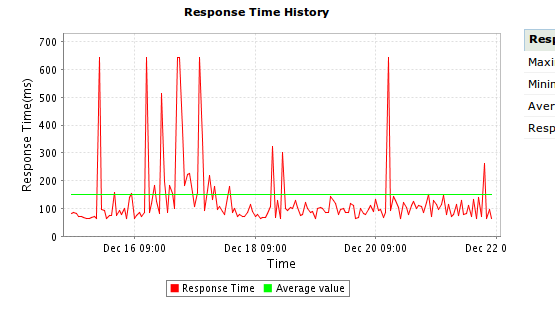
(Screenshot response times Site24x7)
If your website and server is working fine, the number of downtime messages should be very low. If you need to spend several dollars a month for SMS/text messages, it might be useful to spend this money for better hosting. Website monitoring is to get warned if something went wrong.
Website Monitoring Service Provider
In this article we review three website monitoring service provider, all of them offer a great service product and you find them in a lower price segment. That will say, these services are acceptable for most of the websites on the Internet.

I used Site24x7 since they started offering services a few years ago. They offer anything you need to monitor your server or website; Tests on websites or server ports (you can monitor every server port) are only a view options. Visit their website for all the features they offer. They offer a free account and 15day trials for their paid services, if you use the standard or premium service you pay for each single test period and location. If you need multiple test locations, you should use the premium plan because this plan includes 6 free locations for each test. If you need more than one website tested from multiple locations, than is this provider more expansive than others.

Hyperspin is monitoring provider who offers a lot of features and also a great reseller program. If you’re looking for a way to monetize your websites traffic, by offering your own monitoring service, you should try them. All test features are available and they have multiple locations and you can setup four of them as a global setting for all your tests. They don’t charge you for using all the locations. They offer discounts if you buy more or if you pay in upfront for a whole year. I stopped using them because their control panel was several times not accessible from my laptop (using different IP addresses).

Pingdom is the current service I’m using to monitor all my websites. Their control panel and website looks very modern and they offering a great plan with five tests for only $9.95/month. They offer e-mail, SMS/text message notifications and a some great integration with Twitter. Multiple test locations are included without any additional charge. I like the fast and clear interface and off course the price. I’m sure I will keep using them the next years.
While most of the features for these three website monitoring service providers are the same, is the pricing very different. I’m sure all three working great, just try them.
Published in: Web Hosting

We have a number of VPS customers that use these services and they are invaluable. Often we are able to be notified of a problem and even resolve it even before our customers become aware of it. Of course we tell them so that that we are seen to shine!
Many providers also report site response times which – given that Google is using this as parameter in its search now – is a great extra check against the server host.
We are using TurboMonitor to check our websites. It’s a free beta product that sends SMS really fast if something is detected on your internet services. Pingdom is good as well, but with the free version you can only check one website.
Nice free alternative, I think good enough for personal sites. They offer 20 free SMS messages a month that’s really good. I don’t think that you can compare them with Pingdom ;)
@Gons: I will try TurboMonitor and see if it works fast. Thanks for the info btw
I use AlertX, they have free plan as well. Their features aren’t as rich as most of the commercial services out there but has all the basic tools I need. Their payment subscriptions are also the most affordable I’ve found on the internet.
Hi Scott,
it’s okay to mention your service here :)
Just checked your site and I like that you offer plans for one yearly payment, but I have some comments:
I’m sorry but your service doesn’t have an extremely competitive price, there are many services offering more for less money. Sure the doesn’t allow unlimited sites for $99.99 / year but someone with more than 5 sites needs more than an email message after 15minutes if a website is down.
Olaf, the $19.99 per year plan (10 sites) works fine for me. I agree with you that its not as quick as commercial sites and that the features arent as rich, but from the pricing that I’ve seen for these other services, I really don’t see a comparable alternative. Most sites expect me to pay close to $19.99 a MONTH to monitor just 1 site when I dont need all the bells and whistles, just an email alert when my site goes down.
Don’t compare apples with pears :)
Almost all services mentioned on this site are less than $10 for 1 website. 15 minute tests are never very expensive. If your budget is so small, just try Turbomonitor they are free.
(and Scott don’t act like a user because you’re the owner of AlterX)
;)
Is there something like a free website monitoring? How about for website owners who cannot afford to buy this tools? is there a such tool? I have used site24x7 before and even up to now, I am just curious if there was a free tool or open source tool.
Hi,
there are many companies offering free plans too. Sure they will not test your site every 5 minutes but this is not so important if you have zero budget right?
You can build your own system too, try Piwik
Why don’t you do it on your own, rather than using services like pingdom or alertfox?
Hi Peter,
I think you can’t compare your script with services like Pingdom or even basic an free services like UptimeRobot. You know that these services offering much more features than the suggested script.
A webmaster needs multiple test locations, graphics and I test websites always for some existing text and not for the “online” status.
Your script looks good, but you need also some technical skills to get this working ;)
…it depends what apples you’re comparing to which pears! :) There are free services out there such as StatusCake.com – http://www.statuscake.com – which check every 5 mins. I don’t think any service – free or paid – which checks every 15 mins or even every hour is acceptable!
Hi James,
I signed up for StatusCake, looks nice and you can monitor as many sites you like :)
Thanks for sharing!
nice article, a lot of useful info. I’d like to suggest a tool that I recently launched, it’s over at http://biz-eye.com.
Hi,
How is your tool better than Pingdom or site24x7? You don’t provide different monitor locations (this feature is very important). BTW your application was broken while submitting my first test :(
How is your tool better than Pingdom or site24x7?
– diversity (i don’t check only for uptime + ease of use + a flexible alerting system)
your application was broken while submitting my first test
– sorry about this error. i did not manage to reproduce it, so i’ve created some monitors for your website and assigned them to your account. i’m really interested in your opinion on the app so feel free to email me with any question or issues you might have(raul@ [domain]).
Hi Olaf,
Nice article. Maybe you want to give Uptrends – http://www.Uptrends.com – also a try? We offer a 4 week free trial, 5 minutes monitoring period and a global monitoring network with 100+ checkpoints based on every continent.
Hello Raul,
I see you provide some other features that others don’t provide. I think it’s a nice mix of data for “basic” usage. The professional needs more. I’m wondering how many “less professional” user will pay $10/month for some monitoring. You get my point Raul, I don’t say it’s bad…
Hey Olaf,
I get your point, the app is really new. I got it out there to see what people think :)
And since you had a look, I’d love to know your opinion on it(what you like, what you don’t like, what you think it’s missing)…
I try to provide “basic” interface for regular users, but still have some advanced statistics too.
Sometimes means “cheap” really “cheap”…
I used a free service name tagBeep during the last month because they offered a free plan for unlimited sites. Like I posted before, I know that a 100% free plan can’t have the quality of a paid plan but the interface was good and I used them for my “less” important sites.
Yesterday I had the plan to share their URL with a friend and noticed that complete site was gone!
No goodbye, no email warning, just nothing. This what you got (sometimes) if you use a free service which doesn’t have a strong base of paying customers.
Hi Raul,
first of all provide a link to CP on your homepage :)
An important information I can’t see is the response time, I like to see how my website or host performs. Data retention is important too.
If you like to provide a great additional service, create something like Google alerts where the user can enter some keywords and if your “bot” found them somewhere on the net report them. Maybe you can mix the date from different search engines?
Skip the PR feature, the chance is big that your server get blacklisted by Google if you check them so often.
Hi Wilbur,
I’m sure I will check your service (if I find the time). In the meantime where is your service different or better than Pingdom or site24x7?
If I need have a budget for website monitoring I would go for Pingdom because they are reliable and trusted by a lot of users. How do I know that your service does the same?
PS. Is uptrends a dutch company?
Hi Olaf,
Yes we are a dutch company but we do have offices in the USA and Germany aswel. We offer our services – website-, server-, and transaction monitoring – in 45 different countries. I’ll not say that our services are better than the one you mentioned but we do have a global monitoring network of 100+ checkpoints based on every continent. Next our pricing is not based on ‘SMS’ bundles. Feel free to contact me if you have further questions.
Very useful list. I would suggest adding GotSiteMonitor.com to the list. It also gives user 5 free website monitors with 5-minute monitoring interval from multiple monitoring locations.
Hi James,
this is a nice one, 5 website monitors for free and also 20 SMS on signup. That’s much more than most other paid services offer.
Thanks for sharing!
Hi Olaf,
I know this might be coming a bit late, but since I just came across your blog, have you had a chance to look at Webmon.com? – We like to call it Website Monitoring Done Right!, with a focus on Realtime Web Monitoring & Escalation.
Let me know your thoughts!
Mark
I think that I can add one more tool to monitor not only a site, but a server, a database, web applications – this is Anturis which helped me to avoid a lot of troubles in the business.
Hi Harry,
nice service, do you think they will offer RUM service in the near feature? If you like to know what RUM is, check the website from Pingdom or Statuscake.
Hi Olaf,
There is another service uptimedoctor.com. They give first year free for all paid plans and their plans are so attractive. They have a free plan also giving 2 websites free with 1 min check. I have started to use recently.
Thanks.