
Upload images for usage in TinyMCE
TinyMCE is a great online WYSIWYG editor which is used for a lot of projects, for example this WordPress blog application (the content backend). I use TinyMCE for custom projects too. TinyMCE is free, generates good HTML code and the interface is easy to learn even for non-webmaster.
The project is open source and the developer Moxiecode earns money by selling useful plugins for image and link management. Sometimes the Image manager “looks too big” for projects, in this case the following (free) solution is an option. You can download your TinyMCE copy from the TinyMCE website.
The editor has two different modes: simple and advanced mode. In the advanced mode is it possible to load several (already included) plugins. The advanced image function has an option to select images from a list. This list is a just a little JavaScript snippet which stores file name and the alternative text notation:
var tinyMCEImageList = new Array(["Logo", "logo.jpg"]);
Using PHP we are able to generate this list dynamically. But first we need a script that uploads the images and store the data into a database. We use for our example my PHP Upload Class. The following snippet should do that job (check the examples with the upload class for more information about the upload process). Store this code together with an upload form in some PHP script.
<?php
include_once ('upload_class.php');

$max_size = 1024*250;
$error = '';

if(isset($_POST['Submit'])) {
	$my_upload = new file_upload;
	$my_upload->upload_dir = $_SERVER['DOCUMENT_ROOT']."/fotos/";
	$my_upload->extensions = array(".png", ".gif", ".jpg");
	$my_upload->rename_file = false;
	$my_upload->the_temp_file = $_FILES['upload']['tmp_name'];
	$my_upload->the_file = $_FILES['upload']['name'];
	$my_upload->http_error = $_FILES['upload']['error'];
	$my_upload->replace = "n";
	if ($my_upload->upload()) {
		$conn = mysql_connect("localhost", "user", "pw");
		mysql_select_db("database", $conn);
		mysql_query(sprintf("INSERT INTO foto_table SET file_name = '%s', alt_txt = '%s'",
			$my_upload->file_copy),
			mysql_real_escape_string($_POST['alt_txt'], $conn)
		);
	}
	$error = $my_upload->show_error_string();
}
Next we need a script that will create the image list from the data we have stored in our database:
<?php
$conn = mysql_connect("localhost", "user", "pw");
mysql_select_db("database", $conn);

$dir = '/fotos/';

$sql = "SELECT * FROM foto_table";
$res = mysql_query($sql);
$js = 'var tinyMCEImageList = new Array(
	// Name, URL';
while ($obj = mysql_fetch_object($res)) {
		$js .= '
	["'.$obj->alt_txt.'", "'.$dir.$obj->file_name.'"],';
}
$js = rtrim($js, ',').');';
echo $js;
Now we are able to use this dynamic list in our TinyMCE WYSIWYG editor. The following JavaScript snippet shows a very basic configuration, The script has many options and maybe you have already your own configuration in your content management system.
tinyMCE.init({
	mode : "specific_textareas",
	editor_selector : "mceEditor",
	plugins : "style,fullscreen,paste,advimage",
	theme : "advanced",
	external_image_list_url : "lists/images.php",
	apply_source_formatting : true,
	relative_urls : false,
	remove_script_host : false
});
The most important part are the declarations for the plugin and the image list. With these settings you should notice the dialog box:
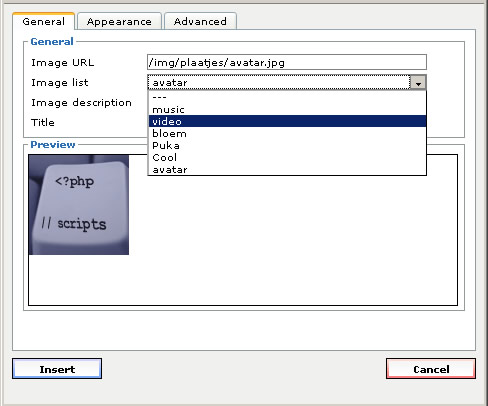
As you see the alternative name is used in this list and also for other attributes within the image element.
This example is a quick and free alternative if you don’t like to buy the commercial image manger. You can download the php example files here.
Published in: PHP Scripts

you should check out the filebrowser callback:
file_browser_callback : ‘yourJsFileBrowser’,
I used it in a project:
file_browser_callback : ‘pixelFileBrowser’,
function pixelFileBrowser (field_name, url, type, win) {
var picker_url;
if (type==”file”) {
picker_url = ‘/admin/pages/js_list’;
} else {
picker_url = ‘/admin/files/browse’ + “?files_filter_by=” + type;
}
tinyMCE.openWindow({
file : picker_url,
title : “File Browser”,
width : 600,
height : 400,
close_previous : “no”
}, {
window : win,
input : field_name,
resizable : “yes”,
inline : “yes”, // This parameter only has an effect if you use the inlinepopups plugin!
editor_id : tinyMCE.getWindowArg(“editor_id”)
});
return false;
}
Thanks dude!
I didn’t new I could create a select image list in TinyMCE. I’ve made a CakePhp function that grabs my images from a resource folder.
The trick also works for TinyMCE Media plugin. You should only change the array name to “tinyMCEMediaList” and fill it with .swf, .cdr, .avi, .mov or other supported media files:
var tinyMCEMediaList = new Array(
    ['interior_final.swf', '/site/files/resurse/interior_final.swf'],
    ['interior_final2.swf', '/site/files/resurse/interior_final2.swf']
);
Here is the API:
http://wiki.moxiecode.com/index.php/TinyMCE:Plugins/media
Yes right, you can create this list for images, links, media and templates.
I use the link list in a current project. I created a list of pdf’s and pages (created with the CMS).
Hi Olaf,
I enjoyed your tutorial, but I am having trouble implementing the process. I am not sure which folder should the images.php script should be placed in b/c when I use TinyMCE and press and push the “image” button TinyMCE takes me immediately to the the default external image page:
../tiny_mce/plugins/advimage/image.htm
rather than
/tiny_mce/plugins/advimage/image.php
my javascript for tinymce looks like
tinyMCE.init( {
plugins : “advimage”,
external_image_list_url : “image.php5?x=”,
mode:”textareas”,
theme: “advanced”
});
I’d really appreciate any help you could provide…
Hi,
the list shows up inside the regular image dialog, if you have trouble with the pathes, just place the list file in the same folder where your form is located.
@kenrick,
maybe you can explain your comment a little more?
Any idea on how to do this using the FCK Editor?
@Cnizz,
I’m sure it’s possible… I removed all FCK editors from website because of the very bad code generated bij FCK
@Olaf,
good one, thanks ;) I was also looking for a CMS tutorial here but guess it not longer available, am I right?
Hi mt,
which tutorial are you looking for? (I never remove tutorials from my websites)
olaf, as i know tinyMCE size is very large than FCK, is that okay for bandwidth use? i using FCK now, bofore it i using openwebware. Even using FCK load icon menu to apear very slow.
Hello andreee,
actually you load some static pages and images. After they are loaded once you will access them from you browsers cache.
TinyMCE is 100% client and and no server side code is executed.
TinyMCE creates much better code FCK editor and this is the only thing what is important ;)
Okey, i will try and change my editor with TinyMCE.
how about spawn? i download it from sourceforge, and there is another one : cuteeditor, but not free :(
sorry don’t know the other editors you have mentioned, look most of the bigger projects using TinyMCE (wordpress too)
Good day to everyone!
I need someone to help me to create a plugin for tinyMce to upload and/or select images. It is similar to plugin advimage included into tinyMce, but with different fields.
What I would need is exactly according to this image: http://img534.imageshack.us/img534/4006/pluginv.jpg
All images have to be stored in a folder called “images”, and thumbs in a subfolder called “thumbs”.
Therefore, if I upload a new image or I select an image I should have the possibility to select alignment (see picture to understand what I mean).
Is there anyone able to do that?
Thank you and hear you soon…
Pino
Hello Pino,
do you tried this tinyMCE plugin?
http://www.lunarvis.com/products/tinymcefilebrowserwithupload.php
Just checked this free plugin too:
http://www.phpletter.com/Demo/Tinymce-Ajax-File-Manager/
(simple and powerful)
Hi all Loved the tutorial, but having problems calling the images back. On the dropdown list theres a list but can’t seem to see the fonts colour.
http://imageshack.us/photo/my-images/849/insertimage.jpg/
As you can see in the image what I am having troble with.
Hi Bobby,
what do you see if you open the file list using your browser?
(the file where you have all these code: var tinyMCEImageList = new Array([“Logo”, “logo.jpg”]);)
Hi Olaf,
All I see is the following;
var tinyMCEImageList = new Array(
// Name, URL
[“Logo 1”, “media/logo.jpg”],
[“Logo 2 Over”, “media/logo_over.jpg”],
//Select image from database cms1 from a table called file_table
Kind Regards and appreciated for the help
Do you enabled the adv. image plugin in your JS code snippet? Maybe you can post your code to pastebin and share this link here?
Hi Olaf,
Here’s the link of the syntax;
http://pastebin.com/embed_js.php?i=5UDnTMTb
Appreciated for the help
Hi Bobby,
the code looks good, maybe you need to check the pathes to the image lists?
and is this entry valid?
external_image_list_url : "images.php",I have noticed you have two setting for this URL
Hi Olaf,
This is the syntax for the List conntection the image.php
http://pastebin.com/embed_js.php?i=dA40g2GN
This is the syntax for the upload form;
http://pastebin.com/embed_js.php?i=ypmTrcbd
And as I am working on he local machine on xampp the folder directory as follows for the image to be stored in;
C:\xampp\htdocs\cms1\admin\media
I’m sure your code is fine, but you need to check the path for the image list.
Put the image.php file into the “lists” directory and update the setting in your JS code (remove also the duplicate setting)
Hi Olaf,
I have placed the image.php into the list folder. As you can see in the following syntax;
// Drop lists for link/image/media/template dialogs
template_external_list_url : “lists/template_list.js”,
external_link_list_url : “lists/link_list.js”,
external_image_list_url : “lists/images.php”,
media_external_list_url : “lists/media_list.js”,
It’s still having the same problem.
Any other suggestions?
Appreciated for the help Olaf
So my images are stored on;
C:\xampp\htdocs\cms1\admin\media
and the directory in the php is;
$dir = $_SERVER[‘DOCUMENT_ROOT’].’/cms1/admin/media/’;
Would that be correct?
If you can open the image.php via the browser and the array shows up, the list should be okay.
Strange is that anything else seems to work, do you have any public URL you can show me?
Hi, do you have a link to download everything including TinyMCE and your code that already working together?
I see you got it already working :)
If you download the example (link at the end from this article) you can see how I use the function inside the file “editor.php”.
It’s not a great idea to host a copy of TinyMCE together with my tiny example, the have so many updates over the year…